
Use Claude Code from your iPhone
The short answer: Claude Code can’t run on an iPhone, but you can steer one running on your computer. amux’s iPhone app shows every agent on every computer, Claude Code and Codex together, in a screen built for a phone, and lets you answer them, review their changes and start new ones. For Claude Code alone, its Remote Control feature connects a session to the Claude app. An SSH app also works, if you can live with a terminal on a phone keyboard.
Where it goes wrong
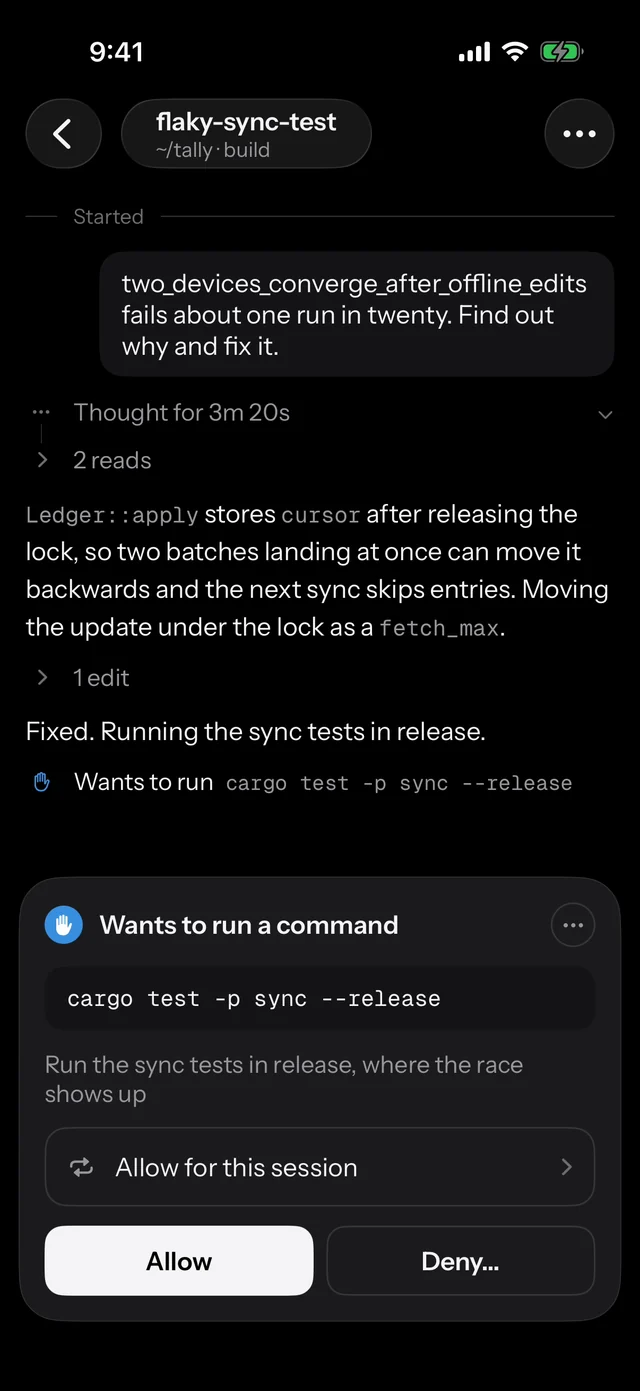
You’re working on Tally, a small accounting app. You leave an agent chasing a flaky test and go out. Ten minutes later it wants permission to run one command, and it stops to wait for you.
You find out when you get home. A one-second answer has cost you the afternoon.
Why it happens
An agent asks you things, and it waits until you answer. That’s the right behaviour, but it means your agents move at the speed you check on them. Fixing that from a phone takes three things:
- A way to reach your computer from wherever you are, through whatever your home router or office network allows.
- A screen built for a phone, because a terminal app was never meant to fit one.
- A signal, so you don’t have to keep looking.
Without amux
Remote Control
Remote Control connects a session
on your computer to the Claude app, on iPhone or Android, or to claude.ai/code. Start
one with claude --remote-control, or run /remote-control in a session you have
open, and it can send push notifications when Claude needs you.
It needs a Claude subscription. By default you turn it on session by session, and the session has to stay open, so if you close the terminal it goes offline. It’s for Claude Code only. Codex has its own route through the ChatGPT app, which you set up from the ChatGPT desktop app.
Cloud sessions
The Code tab in the Claude app starts a session on Anthropic’s machines. That’s handy for a quick job on a GitHub repository, but it isn’t your computer, so it doesn’t have your tools or your agents.
An SSH app and tmux
An SSH app on your phone, with tmux on your computer, reaches anything. You’ll need a way in from outside, such as Tailscale. After that you’re typing into a terminal on a phone keyboard, and nothing tells you when an agent is waiting.
With amux
Agents keep running on your computers, and amux for iPhone is where you follow and steer them. It’s free on the App Store and needs iOS 26. With amux installed on your computer, run this and scan the code:
amux pair --qrThat’s the only setup, with nothing to turn on for each agent. Every agent is on your phone from the moment it starts, and stays there after its terminal closes. The Agents tab shows every agent on every computer you’ve paired, Claude Code and Codex alike, with what each one is doing or waiting for.
When an agent needs you, its question appears as a card in the chat, with the command or the diff it’s asking about:
You can do more than approve things:
- Review changes. Read every file an agent touched, comment on a line, and send your comments back as one review.
- Start new agents. Tap +, then pick the computer, the folder and Claude or Codex. Turn on New worktree to keep it out of your other agents’ way.
- Dictate. Tap the microphone instead of typing.
Close the app and nothing stops, because the agents run on your computers.
On the same network as your computer, all of this is free and needs no account. With Pro, you reach your agents from anywhere through the relay, encrypted end to end, and get a notification when an agent needs you. Notifications are encrypted for your phone before they leave your computer. If you already use Tailscale, your phone can reach your computer that way for free.
Your computer still has to be awake. For agents that work through the night, or while your laptop’s in your bag, put them on a server.
To go further, Connect your phone covers pairing, and iPhone app covers everything the app does.
Last reviewed on 6 November 2026.
Next: You want a second agent without a second setup Use Claude Code and Codex side by side